Zwift training plan
A smarter way to plan your Zwift training
SmarterTraining gives you adaptive daily coaching and runs your workouts on your smart trainer — no second app required. Prefer Zwift’s virtual worlds? Ride your recommended session there instead.
How Zwift and SmarterTraining fit together
Zwift solves the hardest part of indoor riding: making it engaging. Virtual worlds, structured workouts, group rides, and racing turn a stationary trainer into something you actually want to do.
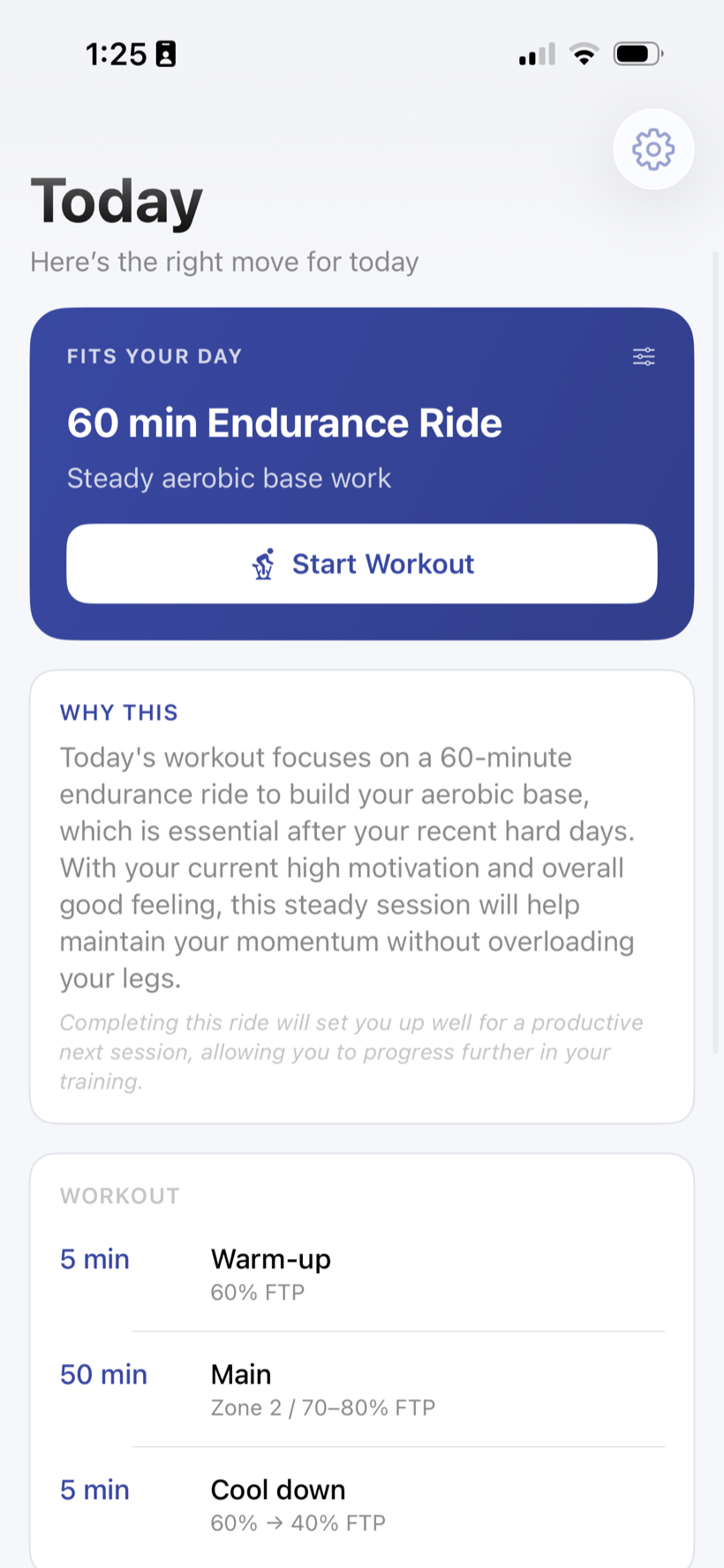
SmarterTraining is a complete training app in its own right. It decides what you should ride today based on your recovery and your week, then runs the session on your smart trainer over Bluetooth — so you can train start to finish without a second app. If you also love Zwift, the two pair naturally: take your recommended session into Zwift whenever you want the immersive experience. SmarterTraining works on its own or alongside it.
The daily workflow
Step 1 — Check in
Decide what to ride
Complete a 30-second check-in. Get a recommendation that fits your recovery, available time, and recent training — for example, an endurance ride, a recovery spin, or an interval session.
Step 2 — Ride it
Execute the workout
Run the session on your smart trainer right in SmarterTraining over a Bluetooth connection — then save it and send it to Strava. Want a virtual world instead? Ride the matching session in Zwift.
Why pair them
Coaching and execution in one app
Do your check-in, get today’s recommendation, then run the workout on your smart trainer over Bluetooth — start to finish, without leaving SmarterTraining.
No fighting the calendar
When a busy week throws off your schedule, the recommendation adjusts — so you are not staring at a plan that no longer fits.
Use Zwift when you want it
Worlds, group rides, and races are what Zwift does best. When you want that, ride your recommended session in Zwift instead — SmarterTraining works either way.
Manage fatigue across the week
Because the recommendation factors in recovery, you avoid stacking too many hard sessions back to back — in SmarterTraining or in Zwift.
Recovery and fatigue management
The risk with a tool as fun as Zwift is doing too much of the good stuff. Group rides and races are easy to stack, and a week of back-to-back hard efforts can leave you flat. SmarterTraining helps by factoring recovery into each recommendation, so the harder Zwift sessions land when you can absorb them — and easier days show up when you need them.
If you are weighing platforms more broadly, our TrainerRoad vs Zwift guide breaks down what each is for, and where SmarterTraining sits in the ecosystem. And if a rigid, plan-led structure is what is pushing you to look elsewhere, our TrainerRoad alternative page covers the adaptive approach in depth.
Frequently asked questions
- Does SmarterTraining replace Zwift?
- It can. SmarterTraining is a complete training app: it recommends your workout and runs it on your smart trainer over Bluetooth, so you do not need Zwift to train. They simply do different jobs — Zwift adds virtual worlds, group rides, and racing. Use SmarterTraining on its own, or ride your recommended session in Zwift when you want that experience.
- How do I use SmarterTraining with Zwift?
- Do your daily check-in in SmarterTraining to get a recommended session. You can run it straight away on your smart trainer inside SmarterTraining, or — if you would rather ride a virtual world — open Zwift and pick a workout or free ride that matches the recommendation.
- Why not just follow a Zwift training plan?
- Built-in plans are useful, but they are scheduled in advance and assume your weeks are consistent. SmarterTraining adapts to the week you are actually having, so the workout fits your current recovery and available time — whether you run it in SmarterTraining or ride it in Zwift.
- Do I need a smart trainer?
- SmarterTraining connects to your smart trainer over Bluetooth and runs the workout in the app, so a smart trainer lets you complete the whole session without leaving SmarterTraining. Without one, you can still follow the recommended session on other equipment.
- Is SmarterTraining free?
- The workout library and execution features are free. Adaptive coaching — the daily check-in and today’s recommendation — is available with Pro, which has a 7-day free trial. You can use it on its own, or alongside your existing Zwift subscription, from the first day.
Plan your Zwift training the smarter way
Get today’s workout and ride it in the app — or take it into Zwift when you want the virtual world. Workouts are free; adaptive coaching has a 7-day free trial.
Keep exploring
Indoor Cycling App
What SmarterTraining is, how daily recommendations work, and smart-trainer compatibility.
AI Cycling Coach App
AI-assisted coaching that trains around work, family, travel, and fatigue.
Adaptive Cycling Training
What adaptive training means and why static plans fall apart in real weeks.
TrainerRoad Alternative
A respectful comparison for riders who want coaching that adapts to real life.
TrainerRoad vs Zwift
Workouts vs virtual riding — what each platform is for, and where SmarterTraining fits.
Best Indoor Cycling Apps
An honest 2026 overview of Zwift, TrainerRoad, TrainingPeaks, Wahoo SYSTM, and more.
Free cycling calculators
FTP Calculator
Estimate your FTP from a 20-minute test and get your seven cycling power zones in watts.
W/kg Calculator
Turn FTP and body weight into watts per kilogram and see where you sit against performance categories.
Cycling Power Zone Calculator
Generate a full training-zone table from your FTP — percentages, watt ranges, and what each zone trains.